The first access for community operators (administrators, moderators and observers) follows the same process. Administrator accounts are created by the Norstat Voices Support team and, from them, administrators create the moderator and observer accounts. See how in Add and Manage Operators.
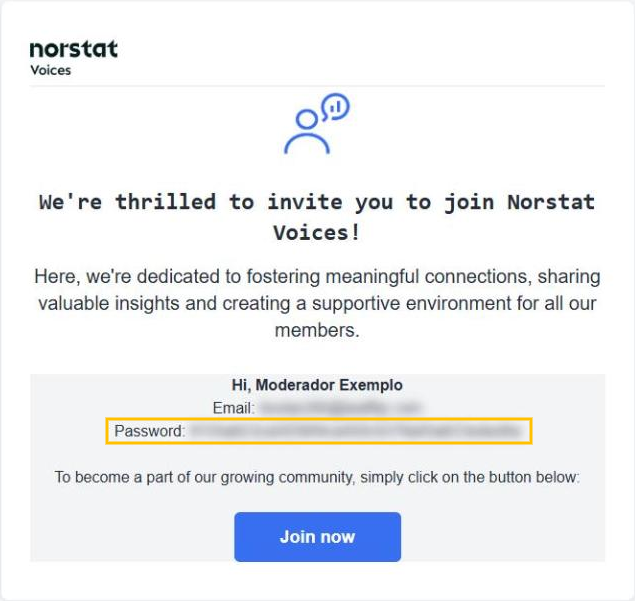
1. Open the invitation email
You will receive an invitation email from Norstat Voices with your login email and an automatically generated password (highlighted in yellow). Click “Join now” to open the login page.
2. Log in with the temporary password
On the login page, enter your registered email and the password from the invitation, then click “Log in”.
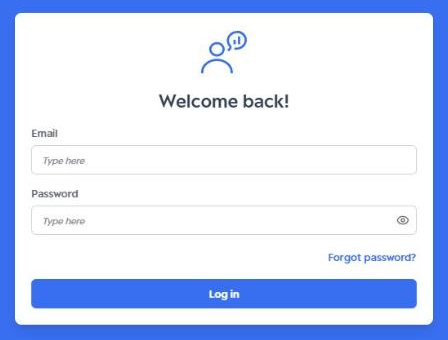
Recommendation: copy and paste the password from the email. Make sure there are no spaces before or after the text and no extra characters.
3. Create your personal password
Next, create a personal password by filling in the “Password” and “Confirm password” fields. Your password must have:
- at least 8 characters;
- at least 1 uppercase letter;
- at least 1 lowercase letter;
- at least 1 special character (for example: @, # or !).
Then click “Save”.
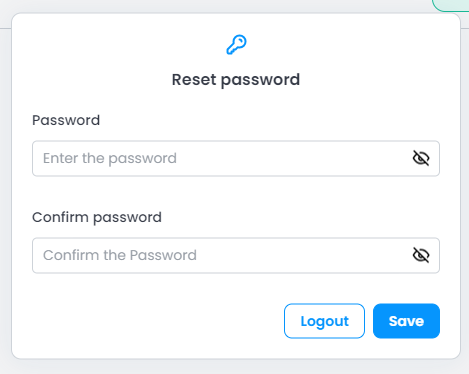
Done! Your access is set up. From now on, log in with your email and new password. Learn more in Login and Logout.
Was this article helpful?
That’s Great!
Thank you for your feedback
Sorry! We couldn't be helpful
Thank you for your feedback
Feedback sent
We appreciate your effort and will try to fix the article